- PHP 7.4 or higher
- Roundcube 1.5, 1.6
Dropbox
 Dropbox
$45
Highlights
- Roundcube Dropbox Integration
- Cloud Email Attachment Storage
- Attach From Dropbox
- Save To Dropbox
Requirements
| Roundcube | 1.6, 1.7 |
| PHP | 8.0 or higher |
| Config | Dropbox App key |
Details
| Latest upgrade | Sep 9, 2026 |
| Plugin version | 1.2.3 |
| Framework version | 2.1.2 |
Installation instructions
ROUNDCUBE PLUS DROPBOX PLUGIN
=============================
This plugin provides the following functionality:
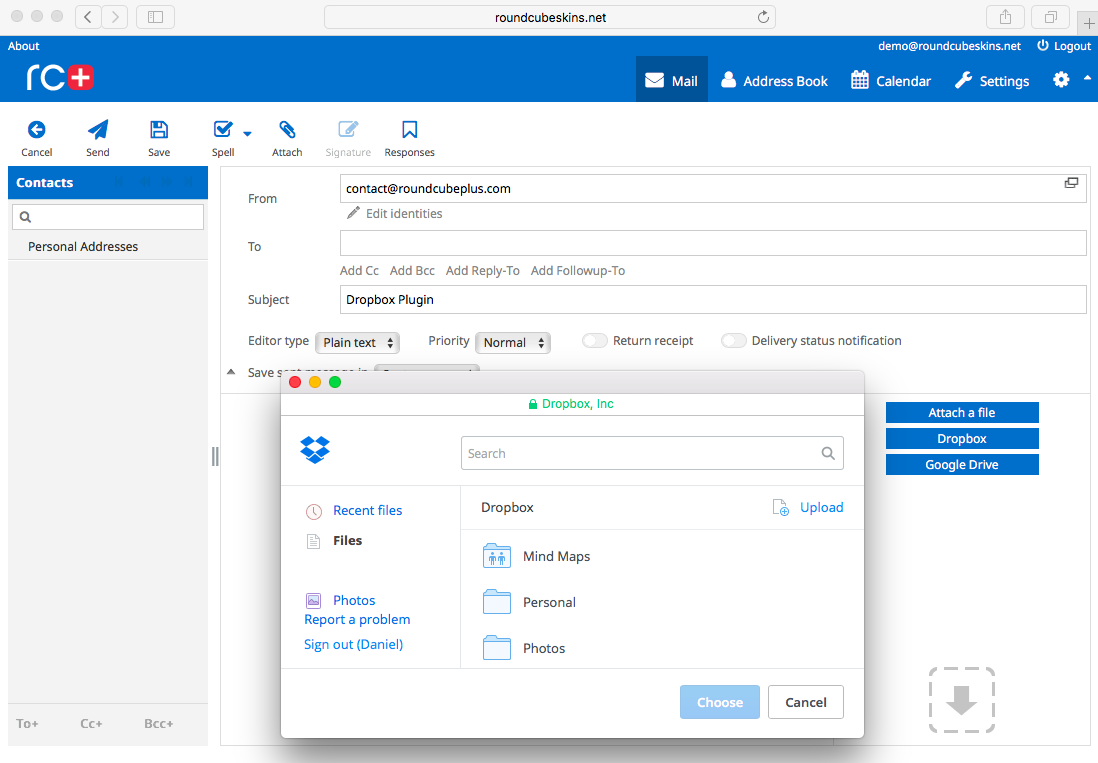
1. It adds a Dropbox button to the attach area of the compose page and allows selecting files from a Dropbox
directory. The selected files can be either inserted as links to the message body or downloaded to the server and
attached to the message as normal file attachments.
2. It adds Dropbox menu items to the attachment drop-down menus on the message view page. The menu items allow
saving (uploading) the attachments to a Dropbox directory.
3. It adds Dropbox links to the attachments displayed in the message body, under "Show" and "Download".
The links allow saving the attachments to a Dropbox directory.
REQUIREMENTS
------------
- Roundcube: 1.6, 1.7
- PHP: 8.0 or higher
- Config: Dropbox App key
INSTALLATION
------------
1. Copy the directories xdropbox and xframework included in this package to the 'plugins' directory of your Roundcube
installation.
2. Rename the file <roundcube>/plugins/xdropbox/config.inc.php.dist to config.inc.php.
3. Edit the file <roundcube>/plugins/xdropbox/config.inc.php, specify your Dropbox app key and configure the plugin
according to your needs. In order to get the app key, you need to create a Dropbox app:
https://www.dropbox.com/developers/apps/create
4. Make sure that the temp directory specified in the Roundcube config file is writable, otherwise the plugin
will not be able to save email attachments.
5. Edit the file <roundcube>/config/config.inc.php, add xdropbox to the plugins array and specify your license key.
For more information on installing Roundcube Plus plugins see:
https://roundcubeplus.com/helpdesk/knowledgebase.php?article=29
COMPATIBILITY
-------------
This plugin has been created for the standard version of Roundcube as provided on the Roundcube website:
https://roundcube.net. It might not work properly with customized versions of Roundcube including the version
provided as part of the Kolab system. Please note that we cannot provide any technical support for the plugin
deployed on a non-standard version of Roundcube.
LICENSE
-------
This plugin is distributed under a commercial license. In order to use the plugin, you must purchase the license
from Tecorama LLC. See the LICENSE file for details.
COPYRIGHT
---------
Copyright (c) 2026, Tecorama LLC
Change Log / Dropbox (xdropbox)
1.2.3 (2026-09-09)
==================
- added config validators
- fixed potential errors caused by invalid config entries
- fixed an SSRF vulnerability in file downloads
- fixed problems with attaching downloaded files on Roundcube 1.7
- fixed problems with compose page image preview
- fixed potential errors caused by invalid Dropbox configuration and file metadata
- updated PHP code compatibility
- improved config documentation
1.2.2 (2026-06-16)
==================
- fixed integration with xcalendar
1.2.1 (2026-05-19)
==================
- ensured compatibility with Roundcube 1.7
- dropped support for Roundcube 1.5
- fixed a potential security vulnerability when attaching files from Dropbox
- fixed save button HTML code
- removed the dependency on PHP's allow_url_fopen setting for file downloads
- updated the save menu item and button UI
- added translations
1.2 (2025-10-14)
================
- added technical documentation for AI Assistant
1.1.9 (2024-11-08)
==================
- fixed file saving functionality
- updated license agreement
1.1.8 (2024-07-15)
==================
- fixed errors with attaching certain file types
- updated config file descriptions
1.1.7 (2023-02-15)
==================
- made the plugin fully compatible with PHP 8.2
1.1.6 (2022-02-28)
==================
- fixed success notification popup UI
- small code changes to make the plugin compatible with upgraded xframework
1.1.5 (2022-01-31)
==================
- fixed PHP warnings in the Roundcube 1.5.2 about dialog
1.1.4 (2022-01-11)
==================
- upgraded the PHP code syntax
- changed the minimum required Roundcube version to 1.4
1.1.3 (2021-09-08)
==================
- upgraded the backend functionality
1.1.2 (2019-11-07)
==================
- upgraded the plugin to work with Rounducbe 1.4 RC2
1.1.1 (2019-05-22)
==================
- upgraded the plugin to work with Rounducbe 1.4 RC1
1.1 (2018-06-04)
================
- upgraded the plugin to be compatible with Elastic beta
1.0.6 (2017-11-09)
==================
- fixed interface with xcalendar that allows attaching files to events
1.0.5 (2017-06-07)
==================
- made the plugin compatible with RC 1.3
1.0.4 (2017-05-10)
==================
- fixed problems with the plugin not loading properly
1.0.3 (2017-01-04)
==================
- added new protected properties to make the plugin compatible with upgraded xframework
1.0.2 (2016-12-09)
==================
- made plugin compatible with xactivate
- updated license agreement
1.0.1 (2016-11-30)
==================
- made plugin compatible with the updated framework
1.0 (2016-06-01)
================
- initial release
Change Log / Plugin: Framework (xframework)
2.1.2 (2026-09-09)
==================
- upgraded includes to use explicit paths to prevent incorrect file resolution
- fixed problems with file attachments in xdropbox, xgoogle_drive, and xwebdav
- fixed potential type warnings in ajax calls
- fixed potential type warnings in image uploads
- standardised cloud plugins' hooks format
- updated PHP syntax to version 8.0
- added config validator functionality
2.1.1 (2026-06-16)
==================
- added a compatibility layer for elastic's pretty-select elements and alpine.js x-model
- added yubikey font icon
- fixed xcalendar integration with cloud plugins (xgoogle_drive, xdropbox)
- fixed ajax page serving errors
2.1 (2026-05-19)
================
- ensured compatibility with Roundcube 1.7
- dropped support for Roundcube 1.5
- added skin color variable support
- added support for xresell
- updated geolite database
- upgraded enshrined/svg-sanitize (removed a security vulnerability)
- upgraded maxmind-db/reader
- upgraded mobiledetect/mobiledetectlib
- upgrade cloud plugin UI (xdropbox, xgoogle_drive, xwebdav)
- removed angularjs libraries
- removed redundant code in Geo class
- fixed a security vulnerability caused by potentially malformed ID codes in cloud integration plugins
- fixed a potential security vulnerability in sanitizing HTML strings
- fixed potential problems with serving attachments to cloud integration plugins
- fixed potential problems with inserting cloud storage save buttons to message body
- fixed potential problems with displaying sidebar on larry-based skins
- fixed issues with verifying the existence of post variables
- fixed PostgreSQL insert and update problems
- fixed MySQL problems with finding and deleting expired records
- fixed potential problems with date/time localized formatting
- fixed bugs in HTML modifier functions
- fixed initialization bug in input retrieval class
- fixed a bug in sidebar item order verification when dont_override is incorrectly set in config
2.0.6 (2025-12-03)
==================
- added functions for managing RC 1.7 static asset management
- optimized plugin parent class for faster loading
- updated geolite country db
- changed scss naming style
- fixed cloud plugins' link insertion to compose editor
- fixed minor issues with utility functions
- fixed multidomain config loading
2.0.5 (2025-10-14)
==================
- added compatibility with Roundcube 1.7-beta
- updated UI
- improved clipboard functions
- improved template functions
- improved error handling in upgrade functions
- moved quick skin and language change functions from xskin to xframework
2.0.4 (2025-02-24)
==================
- updated automatic database upgrade system
- updated element colors
- added multibox app shortcut
- streamlined localization strings
- added 'copy to clipboard' functionality
2.0.3 (2024-11-08)
==================
- fixed upload functionality used by cloud plugins
- added Arabic translation
- added Bulgarian translation
- added Chinese (Simplified) translation
- added Chinese (Traditional) translation
- added Estonian translation
- added Greek translation
- added Hungarian translation
- added Japanese translation
- added Korean translation
- added Latvian translation
- added Portuguese (Portugal) translation
- added Slovak translation
- added Swedish translation
- updated license agreement
2.0.2 (2024-07-15)
==================
- changed the minimum required PHP version to 7.4
- discontinued Internet Explorer support
- added password show/hide toggle functionality
- added carddav plugin settings icon
- updated spinner animations
- fixed ajax incompatibilities with http 1.1
- fixed potential problems with internal url functions
2.0.1 (2024-04-02)
==================
- fixed the UI text color values
- updated the geo database
- optimized some internal functions
2.0 (2024-01-31)
================
- re-designed the icon sub-system for better performance and usability
- updated the geo database
- updated the common UI
1.9.9 (2023-09-16)
==================
- fixed a mismatched composer package version that required php 8
- updated the ajax error return method
1.9.8 (2023-09-13)
==================
- changed the minimum PHP version to 7.2
- upgraded the composer libraries
- eliminated GeoIP PHP deprecation warnings on PHP 8
- updated the GeoIP database
1.9.7 (2023-05-15)
==================
- modified the icon font to fix the chevron and checkbox icons
- fixed the menu icons on smaller screens
1.9.6 (2023-05-09)
==================
- added the woff2 version of the icon font
- changed the icon for the "Empty folder" action
- updated the translations to include the AI Assistant plugin
- added Norwegian translation
- centralized the controller api call interception
1.9.5 (2023-04-24)
==================
- updated the add_to_apps_menu config functionality to allow usage without $image
- updated settings functions to improve validation
1.9.4 (2023-04-18)
==================
- changed the outlined icon set
- added support for the xai plugin
- updated the common dialog code
1.9.3 (2023-03-14)
==================
- improved settings elements UI
1.9.2 (2023-02-27)
==================
- fixed the skin inheritance recognition
- fixed the download errors for cloud plugins
1.9.1 (2023-02-17)
==================
- changed the IPTools library version to fix PHP compatibility issues
1.9 (2023-02-15)
================
- upgraded svg_sanitizer to eliminate a security vulnerability
- upgraded geoip2 and the dependencies
- replaced the unmaintained tgalopin/html-sanitizer package with inbuilt function
- made the plugin fully compatible with PHP 8.2
- removed code providing RC 1.3 compatibility
- added the S1lentium/IPTools library
- added Danish translation
- added Dutch translation
- added Finnish translation
- added Indonesian translation
- added Lithuanian translation
- added Portuguese translation
- added Romanian translation
- added Slovenian translation
- added Spanish translation
- added Turkish translation
1.8.9 (2022-12-16)
==================
- fixed potential errors if the 'allowed_skins' config value is set to an incorrect value
1.8.8 (2022-11-01)
==================
- fixed svg support in the image upload function
- fixed the view loader function
- updated the xwebdav icon styles
1.8.7 (2022-10-12)
==================
- fixed problems with xsidebar config options being the wrong type
1.8.6 (2022-06-20)
==================
- standardized the minimum required PHP version across all plugins to 7.1
- added the HtmlSanitizer library
- replaced some icons to make the UI more uniform
- added icons for the carddav plugin
- fixed list icon positioning on the elastic-based skins
1.8.5 (2022-05-30)
==================
- restructured html insertions to prevent compatibility issues with third party plugins
- added settings icon for the Thunderbird Labels plugin
1.8.4 (2022-04-06)
==================
- fixed some potential html encoding problems
1.8.3 (2022-02-28)
==================
- added xwebdav icons and translations
- fixed select and save cloud button rendering
1.8.2 (2022-02-15)
==================
- icon modifications
- cloud class and css modifications
1.8.1 (2022-01-31)
==================
- fixed a PHP warning generated by the sidebar on RC 1.5.2
1.8 (2022-01-11)
================
- disabled the apps menu on cPanel due to popup positioning issues
- added the Italian translation
- removed promo support
- fixed user language loading
- fixed flatpickr styling
- fixed flatpickr language settings
- fixed csrf warning
- fixed checkbox display in dark mode
- changed the minimum required Roundcube version to 1.4
- upgraded the PHP code syntax
- eliminated several PHP warnings
1.7.9 (2021-09-08)
==================
- updated the cloud functions
1.7.8 (2021-09-01)
==================
- fixed the apps menu display when no apps present
- code upgrades to support the upgraded xskin
- modified settings/tools icons
- added modal dialog UI code
- added icon for xwebdav
- fixed outline icons in the icon font
- fixed icon size and positioning on buttons
- fixed button spacing
- fixed managesieve plugin icons
- fixed insert user compose icon
- fixed button icon position and size
- fixed the cloud attachment progress untranslated label
- fixed interface popup on larry-based mobile
- updated the cloud attach process to include the load link and file size
- updated the cloud attach process to be compatible with RC 1.5
1.7.7 (2021-08-05)
==================
- enabled support for svg image upload
1.7.6 (2021-07-21)
==================
- upgraded the icons in the icon font
- changed the apps menu to display apps in rows instead of columns
- added Google Drive and Dropbox icons to compose buttons
- updated the Polish translation
1.7.5 (2021-07-15)
==================
- updated the translations
1.7.4 (2021-06-02)
==================
- extended the functionality of hide_about_link to apply to all skins
1.7.3 (2021-05-25)
==================
- fixed and updated the icon font
- added support for dark mode
- removed gif loader images
- improved the database update functions
- internal input token function upgrades
- added support for the skins_allowed config option
- upgraded javascript libraries
- enabled sending system emails from the user identity email instead of the login email
- enhanced the function that returns the current url
- added icons for mailvelope
1.7.2 (2021-02-08)
==================
- fixed the managesieve plugin settings icons
1.7.1 (2021-01-21)
==================
- added icons for x2fa
1.7 (2021-01-11)
================
- added settings icons for x2fa and twofactor_gauthenticator
1.6.9 (2020-11-11)
==================
- updated the German translation
1.6.8 (2020-10-19)
==================
- reduced the size of the roundcube_plus_icon fonts
- added xcalendar mobile new functionality icons
1.6.7 (2020-09-14)
==================
- replaced the datetime picker component with flatpickr
1.6.6 (2020-06-23)
==================
- fixed potential ajax request errors due to ob_clean in sendResponse and Cloud attachment download
1.6.5 (2020-04-29)
==================
- fixed the issue with switching the language to Spanish (Latin America); saving the invalid es_419 as es_ES
1.6.4 (2020-03-12)
==================
- fixed missing scrollbars in full-screen message view (caused by the imported Google Drive js)
- updated icon font
- added function Format::stringToTimeWithFormat() that properly handles decoding d/m/y formats
1.6.3 (2020-03-02)
==================
- fixed the default sidebar visibility state on Elastic-based skins
1.6.2 (2020-02-21)
==================
- fixed an error in getUrl during CalDAV requests
1.6.1 (2020-02-14)
==================
- fixed problems with popover scrollbars on Elastic-based skins
- removed a potential problem with url trailing slashes
1.6 (2020-02-10)
================
- cleaned up and improved javascript and PHP code
- added an config overwrite for the url where Roundcube currently runs (overwrite_roundcube_url)
- fixed the problem select menus getting hidden when using their scroll bars on Elastic-based skins
1.5.9 (2020-01-08)
==================
- added cPanel icon for the return_to_webmail cPanel plugin
1.5.8 (2020-01-02)
==================
- improved xsidebar UI
- added optional attachments to sendHtmlEmail()
- fixed 'hack attempt' log warning when reordering sidebar
1.5.7 (2019-12-17)
==================
- fixed incorrect skin detection on logout (RC 1.4)
- fixed database quoting
- fixed some utils functions
1.5.6 (2019-12-04)
==================
- improved support for SQLite
- improved api functions
1.5.5 (2019-11-25)
==================
- fixed issues with the disable_apps_menu config option
- improved api functions
1.5.4 (2019-11-07)
==================
- fixed Google Drive image attachment save buttons
- added settings links to sidebar titles
- added larry to the quick skin change select
- fixed formatting of plugin links in app menu
- fixed apps menu select UI
- fixed sidebar show/hide button icon
- fixed apps menu text UI
- upgraded the plugin to be compatible with Roundcube 1.4 RC2
1.5.3 (2019-10-10)
==================
- fixed popup menus that randomly didn't execute angular actions (e.g. calendar event preview)
- added new debugging functions
1.5.2 (2019-09-04)
==================
- optimized and improved the image upload function
1.5.1 (2019-09-02)
==================
- added customer config support for multi-client systems (config_ini_file and config_ini_allowed_settings)
- improved api security
- removed phpunit vendor package
- updated mobiledetect
- updated maxmind-db reader
- added a function for resaving and resizing uploaded images
1.5 (2019-07-17)
================
- fixed problems with remote analytics loading
1.4.9 (2019-07-11)
==================
- translated to French
1.4.8 (2019-06-11)
==================
- added crc function
1.4.7 (2019-06-05)
==================
- updated mobile formatting
- fixed sidebar open/close button icons
1.4.6 (2019-05-22)
==================
- upgraded to work with Roundcube 1.4 RC1
- fixed icon placement in icon font
- added 'solid' icon set in icon font
- added forwarded/replied icon in icon font
1.4.5 (2019-03-08)
==================
- fixed 32-bit platform compatibility
1.4.4 (2018-08-01)
==================
- updated geo definitions
- updated mobile detect
- updated docs
- fixed minor code problems
1.4.3 (2018-07-03)
==================
- changed ajax response functions
- added database error logging
- changed lastInsertId function to be fully compatible with Postgres
1.4.2 (2018-06-14)
==================
- fixed javascript time formatting
1.4.1 (2018-06-04)
==================
- added support for the thunderbird labels plugin
- added a config option to set default visibility of the sidebar (xsidebar_visible)
- fixed charset problem in sendHtmlEmail()
1.4 (2018-04-04)
================
- upgraded the plugin to be compatible with Elastic beta
1.3.2 (2017-12-11)
==================
- implemented multi-domain config functionality for all the plugins
1.3.1 (2017-12-06)
==================
- fixed sidebar settings page UI on mobile devices
- added new icons for the junk and not-junk buttons
1.3 (2017-11-09)
================
- upgraded vendor/maxmind to version 2.7
- upgraded geolite database to version 20171107
- upgraded Mobile_Detect to version 2.8.26
- added geo data session caching
1.2.9 (2017-11-01)
==================
- fixed markasjunk2 icons
- fixed analytics
1.2.8 (2017-09-04)
==================
- fixed port handling in Plugin::getUrl()
- fixed message list hover flag icon in widescreen view
1.2.7 (2017-08-18)
==================
- fixed the unsupported provider error in plugins that don't require db access
1.2.6 (2017-07-05)
==================
- fixed errors in Format.php when running /bin scripts
1.2.5 (2017-06-28)
==================
- moved the mobile layout setting functions to xskin
1.2.4 (2017-06-07)
==================
- made sidebar compatible with RC 1.3
- made the cloud plugin platform compatible with RC 1.3
- updated getUrl()
1.2.3 (2017-05-10)
==================
- upgraded the deprecated function rcube_idn_to_ascii()
- added a function to recognize cPanel in XFramework\Plugin
- fixed cloud-based plugin class
- fixed cloud-based attachment save function
- fixed cloud-based plugin UI
1.2.2 (2017-03-22)
==================
- changed the way of recognizing if Roundcube runs under cPanel
1.2.1 (2017-03-17)
==================
- fixed some 32-bit server incompatibility problems
- changed the rc+ watermark file location
1.2 (2017-03-07)
==================
- fixed a translation problem in Geo
- added Polish translation
1.1.9 (2017-03-01)
==================
- added a function for recognizing if running under cPanel
1.1.8 (2017-02-20)
==================
- included howler.js
1.1.7 (2017-02-15)
==================
- fixed toolbar icon size
- standardized translation files
1.1.6 (2017-02-07)
==================
- removed support for geoiplocation database
- set sidebar to be visible by default for new users
- changed the apps menu to include icons
- placed the apps menu behind settings on the menu bar
- changed saving collapsed sidebar items from cookie to user preferences
- moved rc+ font from xskin
- added German translation
1.1.5 (2017-01-16)
==================
- added config options add_to_apps_menu, remove_from_apps_menu
- described config options in the readme file
1.1.4 (2017-01-10)
==================
- made the plugin compatible with SQLite
1.1.3 (2017-01-04)
==================
- added the option of reordering sidebar items
- improved internal functions
1.1.2 (2016-12-19)
==================
- upgraded javascript libraries
- fixed redirection problems on IE
- fixed sidebar problems on IE
- fixed errors when running cleandb.sh
1.1.2 (2016-12-13)
==================
- fixed errors when using quick language change menu
1.1.1 (2016-12-09)
==================
- made plugin compatible with xactivate
- updated license agreement
1.1 (2016-11-30)
==================
- updated the maxmind database
- updated test class
- added unit tests
- added support for license key
- optimized the plugin code
- changed asl url
1.0.9 (2016-11-16)
==================
- made plugin compatible with db_prefix
- removed references to legacy functions
1.0.8 (2016-11-07)
==================
- added an function to create setting help popups
1.0.7 (2016-10-11)
==================
- fixed adding scripts and stylesheets so they don't use full url
1.0.6 (2016-09-27)
==================
- enabled setting skin via a url parameter
1.0.5 (2016-09-20)
==================
- changed the url function to recognize proxy addresses
- fixed the database functions to properly format bool values before saving
1.0.4 (2016-09-06)
==================
- added the Apps button on the toolbar for easy access to Roundcube Plus plugins
1.0.3 (2016-08-15)
==================
- fixed the Geo::getCountryName() warning
1.0.2 (2016-08-08)
==================
- upgraded to be compatible with RC 1.2.1
- upgraded to be compatible with mysql 5.7
1.0.1 (2016-07-04)
==================
- fixed problems with sorting the message list and changing the order of message columns
1.0 (2016-06-01)
================
- initial release
License
Single Roundcube installation, additional licenses can be added in cart.Support
This product includes basic technical support while the license is active.Dropbox
This Roundcube plugin adds the option to save attachments from incoming messages to Dropbox or attach files from Dropbox to outgoing messages.
Key Features:
- Attach files from Dropbox to composed messages.
- Save attachments from incoming messages to Dropbox.
- Seamless integration with existing workflow and systems.
- Save local disk space.
Compatibility
Languages
Arabic, Bulgarian, Chinese, Croatian, Czech, Danish, German, Dutch, English, Estonian, Finnish, French, Greek, Hebrew, Hindi, Hungarian, Indonesian, Italian, Japanese, Korean, Latvian, Lithuanian, Malay, Norwegian, Polish, Portuguese, Romanian, Russian, Slovak, Slovenian, Spanish, Swedish, Turkish, Ukrainian and others.
Frequently Asked Questions
What is the Dropbox plugin for Roundcube?
The Dropbox plugin for Roundcube is an integration that allows you to attach files from your Dropbox account to outgoing emails and save incoming attachments directly to Dropbox, all within your Roundcube webmail interface.
How do I install the Dropbox plugin?
Installation involves uploading the plugin files to your Roundcube plugins directory, adding 'dropbox' to your Roundcube configuration, setting up a Dropbox App to obtain API keys, and configuring the plugin with these keys. Detailed instructions are provided with the plugin.
Is my Dropbox account secure when using this plugin?
Yes, the plugin uses OAuth 2.0 for secure authentication with Dropbox. Your Dropbox credentials are never stored on the Roundcube server, ensuring the security of your account.
Can I use the Dropbox plugin with any Roundcube version?
The Dropbox plugin is compatible with Roundcube version 1.4 and above. Always check the plugin's documentation for the most up-to-date compatibility information.
Does the plugin support file size limits?
Yes, the plugin respects both Roundcube's attachment size limits and Dropbox's file size restrictions. You can configure maximum file sizes in the plugin settings.

© Copyright 2026 by Tecorama LLC. All Rights Reserved.